
Edit the Sidebar
The Sidebar contains supplemental content that appears across pages that use a sidebar-enabled template.
Common sidebar content includes:
- Contact information
- Office hours
- Related links
- Calls to action
- Department resources
Because the Sidebar is a shared template part, updates may appear on multiple pages throughout the website.
Use this job aid to update content displayed within the shared Sidebar template part.
Before You Begin
- Verify information has been reviewed for accuracy.
- Confirm any links and contact information are current.
- Understand that changes may affect multiple pages using the Sidebar template part.
- Review updates carefully before publishing.
Steps
1
Access the Design Editor
- Log in to WordPress.
- Select Appearance from the left navigation menu.
- Click Design.
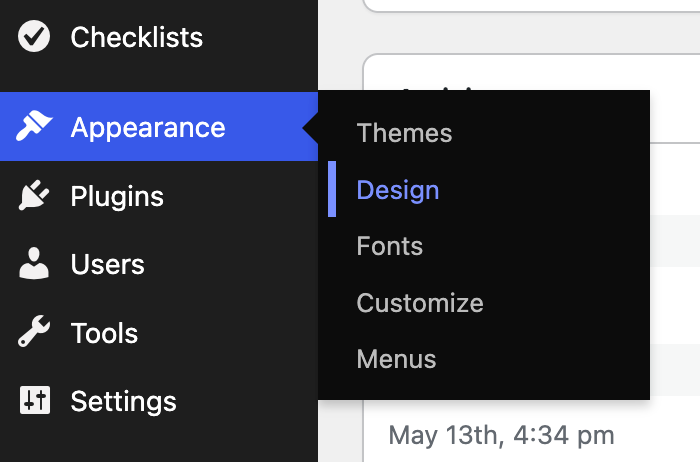
2
Open Template Parts
- Select Patterns from the Design Editor.
- Choose All template parts.
- Open the list of available template parts.

3
Open the Sidebar Template Part
- Locate side-bar.
- Select the template part to begin editing.

4
Update Sidebar Content
- Select the content you wish to update.
- Edit existing content or add new blocks as needed.
- Make the necessary changes.

5
Save Changes
- Review your updates.
- Select Save.
- Verify the banner on the live website.

Tips
Keep content concise
Visitors should be able to quickly locate supporting information without overwhelming the sidebar.Review links regularly
Ensure linked resources continue to work and direct visitors to the correct destination.Prioritize important information
Use the sidebar for information visitors may need frequently while viewing the page.Remove outdated content
Regularly review contact information, resources, and calls to action to ensure they remain current.Verify changes on multiple pages
Review several pages before and after publishing to confirm the sidebar displays correctly throughout the website.
Common Mistakes to Avoid
Overcrowding the sidebar
Avoid adding too much content, which can make important information difficult to find.Leaving outdated information visible
Review contact information, office hours, and links regularly.Duplicating large amounts of page content
The sidebar should support the page, not repeat its primary content.Publishing without reviewing changes
Always verify updates on the live website before considering the task complete.