
Update Navigation Menus
Navigation menus help visitors find information throughout your website. Use this job aid to add, remove, rename, or reorganize links within your website’s navigation menu.
Changes made to the navigation menu are visible to all website visitors, so updates should be reviewed carefully before publishing.
Before You Begin
- Verify any pages being added to navigation have been published.
- Review the current menu structure before making changes.
- Understand that navigation changes affect all website visitors.
- Review updates carefully before publishing.
Steps
1
Open the Menu Editor
- Log in to WordPress.
- Select Appearance from the left navigation menu.
- Click Menus.
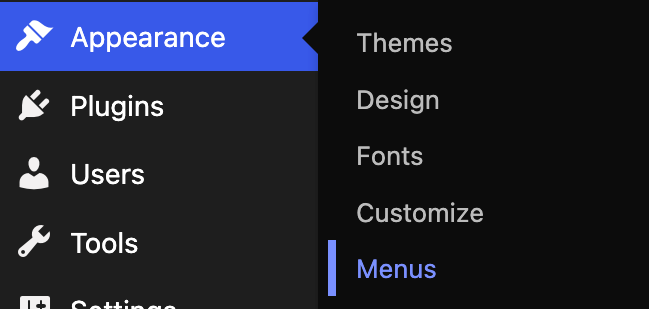
Note: Most MTSU websites use a single navigation menu. If your website contains multiple menus, verify you are editing the correct menu before making changes.
2
Update Navigation Items
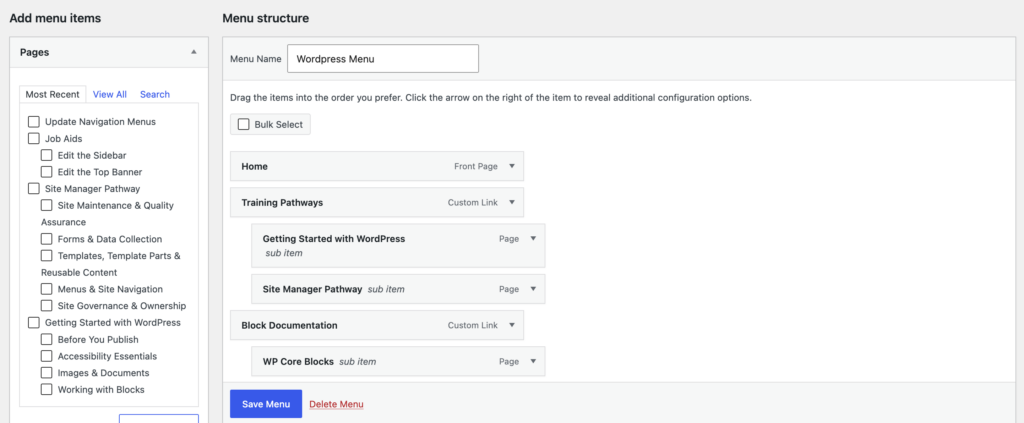
- Add, remove, rename, or reorganize menu items as needed.
- Drag and drop menu items to change their order.
- Drag items slightly to the right to create a submenu item.
3
Save the Menu
- Review your updates.
- Click Save Menu.

4
Verify the Navigation
- Visit the live website.
- Review the navigation menu.
- Confirm menu items appear in the correct order.
- Test any updated links.

Tips
Keep menu labels concise
Navigation labels should be short, descriptive, and easy for visitors to understand at a glance.Group related content together
Organize pages in a logical structure that helps visitors quickly find the information they need.Prioritize important information
Place frequently accessed pages where visitors can easily locate them within the navigation.Review navigation regularly
Update menus as content changes to ensure visitors can always access current information.Verify changes on the live website
After updating a menu, test links and review the navigation to confirm everything displays correctly.
Common Mistakes to Avoid
Creating overly complex navigation
Large or complicated menu structures can make it difficult for visitors to find important information.Using unclear menu labels
Navigation labels should clearly communicate where a link will take visitors.Leaving outdated links in navigation
Review navigation regularly and remove links that are no longer useful or relevant.Exceeding navigation limitations
MTSU navigation supports up to seven top-level menu items and one level of submenu navigation.Publishing without reviewing the live menu
Always confirm navigation changes display correctly and links function as expected.